

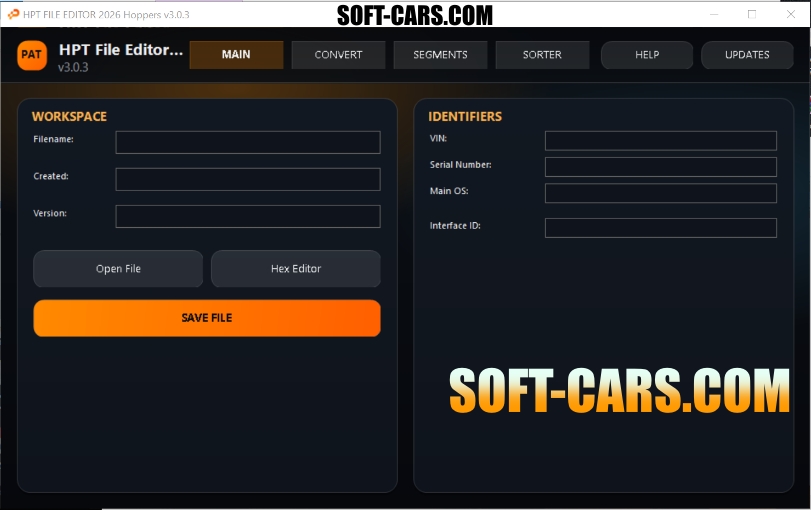
HPT FILE EDITOR 2026 – MAIN APPLICATION HELP
==============================================
What this program does:
– Opens and analyzes HPT files
– Lets you edit/view data (including Hex view)
– Converts between HPT/BIN formats
– Performs segment swap operations
– Saves rebuilt output files
Top Tabs:
1) MAIN/UNLOCK
2) HPT-BIN | BIN-HPT
3) Segment Swap
MAIN/UNLOCK tab functions:
– Open File: Load a source .hpt file and parse module/segment info.
– Hex Editor: Open advanced hex window for raw/segment editing.
– Convert HPT: Convert loaded file between supported HPT versions and save a new file.
– Unlock File: Run standalone unlock patch flow on compatible files.
– Save File: Rebuild and save current working file after changes.
HPT-BIN | BIN-HPT tab functions:
– Bin to HPT: Build/write HPT-compatible output from BIN workflow.
– HPT to BIN: Export either full BIN or separate segment BIN files.
(You will be prompted to choose export mode.)
Segment Swap tab function:
– Segment Swap: Select donor and target files, choose segments, apply copy, and save swapped result.
If prompted, re-open/analyze target to verify values before final save.
Recommended workflow:
1) Open source file
2) Review identifiers / segment data
3) Run desired function (convert, unlock, export, or segment swap)
4) Save output with a new file name
5) Re-open output to validate result
Notes:
– Keep backup copies before any write operation.
– For Segment Swap, only swap compatible donor/target files.
– If an operation fails, reopen the original file and retry with fresh output path.


Reviews
There are no reviews yet.